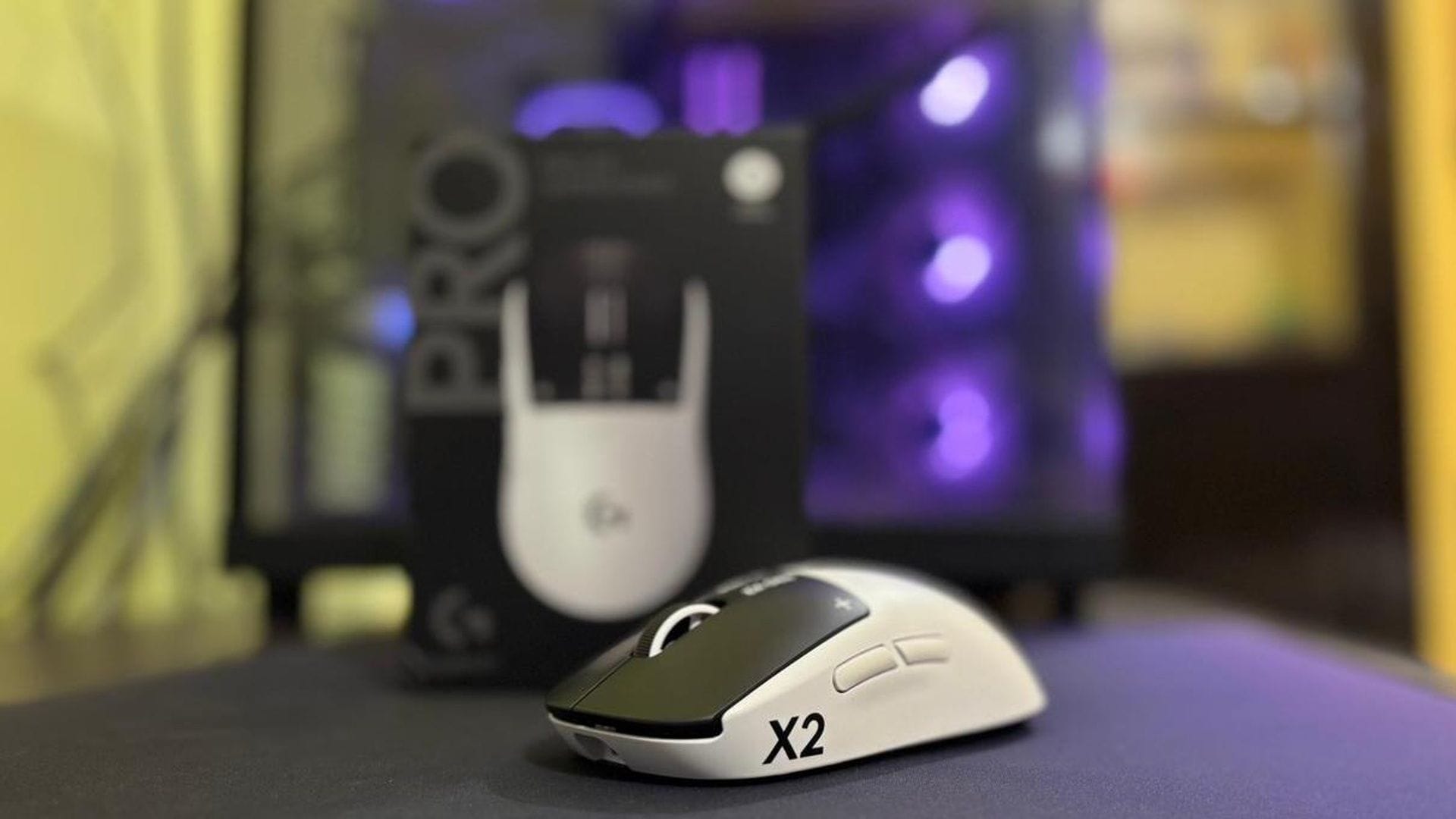
The gaming mouse market had been incredibly stale for quite a while now, with most innovation revolving around keeping the device lightweight, and focusing on different types of switches. I said “had been” because Logitech decided to flip the switch completely, quite literally, with their newest G Pro X2 Superstrike.
In layman’s terms, Logitech G Pro X2 Superstrike mouse reinvents how the switches work by not having any mechanical switches at all on the primary clicks. As someone who likes to tinker with hardware, early chatter about these features had me intrigued, and I had been meaning to get my hands on this one sooner or later. Logitech sending one over for the review was a nice early Christmas gift.
If I had to put it in very short, the Logitech G Pro X2 Superstrike is nothing short of an engineering marvel, and it is the right way for gaming mice to evolve from here on out. It shows that making mice lighter isn’t the only way to progress. Keep reading my review on Logitech G Pro X2 Superstrike to understand why this technological leap is a step in the right direction.
Logitech gets a solid ten out of ten when it comes to the packaging of the G Pro X2 Superstrike. A box wrapped in brown tape with, underneath which sat a triple layer of bubble wrap for added protection. While unboxing, no bubbles were left unpopped. Or some of them were, a triple layer protection is a lot that will save the mouse from all sorts of movement damage.
Once I got past all the protective layers, the main box stood out with a very minimalistic profile. A matte-black box with the mouse’s image etched in a very subtle gloss that isn’t overpowering. It has a double-tape anti-tamper seal, and opening it revealed the beautiful white and black Logitech G Pro X2 Superstrike. From the box, it almost felt like a Panda sitting snug in its cozy home.
Inside the Logitech G Pro X2 Superstrike’s main box, we have the following components:
Although everything about the Logitech G Pro X2 Superstrike had impressed me till this point, the lack of a braided cable in such an advanced mouse stuck out. For a mouse that has such amazing innovative technology and with its price, a braided cable should have been a no-brainer. Unfortunately, the first (and one of my very few) complaints with the mouse was ticked off right at the start.
Logitech sticks with the tried‑and‑tested ergonomic design here – a symmetrical shape that aligns perfectly with what the Pro series is known for. It is smooth, well-balanced, and immediately familiar to anyone who has used one of Logitech’s earlier esports‑focused mice. That said, the side buttons are positioned only on the left, which makes the G Pro X2 Superstrike primarily suited for right‑handed users.
At around 61 grams, The Logitech G Pro X2 Superstrike is not chasing the “hyper‑lightweight” trend with sub‑55‑gram mice. It’s light enough to move effortlessly during flicks in Valorant or fast tracking in Counter‑Strike, yet it retains a density that makes it feel premium and planted. Personally, I do prefer lightweight mice, but I don’t really mind the few extra grams here because the mouse feels much more structurally sound overall.
The outer shell has a matte texture that feels soft and slightly rubbery, but without the sticky sensation that some mice suffer from. It provides an excellent grip and remains comfortable even after hours of use. The back hump follows a mild curve, not too aggressive, keeping it in line with the typical Pro language.
Because of this balanced arch, gamers across palm, fingertip, or claw grip styles should find it easy to adjust. As someone who naturally uses a palm grip, it fits me perfectly and the arch cups the palm snugly without ever feeling bulky. During my testing across multiple gaming and even some work sessions, comfort was never a concern.
I’ll get into the clicks later, since they’re easily the most innovative part of the mouse, and honestly, its biggest selling point. Visually, the Logitech G Pro X2 Superstrike sits in a nice sweet spot between minimal and striking. The white shell contrasts sharply with the black primary buttons, giving it that “Panda” aesthetic. There’s no RGB at all; the black Logitech “G” logo sits quietly at the crest, with small “X2” and “Superstrike” labels printed on either edge in the same tone.
Flip the mouse over and you’ll find a detachable bottom lid, which hides a small slot to store the wireless dongle, a feature you’re likely to use while traveling. Logitech includes a second swappable lid in the box that features PTFE skates, but it adds a bit of weight. I stuck with the default lighter lid since it suited my playstyle better and kept the mouse more agile.
My second gripe with the Logitech G Pro X2 Superstrike lies with those PTFE feet. They’re serviceable, but not exceptional. The glide isn’t as buttery‑smooth as I’d have expected, and after just a week of daily use, the rear feet began to flatten slightly. This is not the first time I’ve noticed this pattern, as my old Pro Superlight suffered from the same symptoms when I had it a few years back. Since most gamers rely on aftermarket skates like the Superglides, it’s not likely to be a dealbreaker.
On a brighter note, the scroll wheel is phenomenal. It delivers a prominent tactile feedback while scrolling, combined with a perfectly balanced resistance and the rubberized texture. The middle click is neither too stiff nor too soft, with just the right travel distance and dampness that is enough for satisfaction without accidental presses. It’s easily one of the best scroll wheels I’ve used in recent memory.
Logitech has genuinely pulled off a generational innovation with the click system in the G Pro X2 Superstrike. While most modern gaming mice rely on optical or hall‑effect switches, both of which have become industry standards for their precision and elimination of double‑click issues, Logitech threw convention out the window here. The Logitech G Pro X2 Superstrike doesn’t use any switches at all. Instead, it introduces something entirely new known as HITS – the Haptic Inductive Trigger System.
Essentially, every click on this mouse is powered by a haptic mechanism rather than a physical switch. The brilliance lies in how deeply customizable this system is. You can tweak everything from the actuation force and how much pressure is needed before your click registers, to the travel distance, deciding whether you prefer a short, snappy click or a longer, softer one.
It’s almost like adjusting a trigger pull on a custom controller, except this time you’re shaping how your mouse feels down to the millimeter. It’s bizarre because customizable actuation is something that I would generally hope to see in a hall-effect keyboard, and not a gaming mouse!
Because there are no traditional switches inside, that familiar “clicky” feedback isn’t inherently present here. But, you can finetune the Click Haptics, which controls how pronounced the haptic feedback feels when you press down. Turn it up, and you’ll feel a strong, distinct vibration, although it is more of a “thump” than a click. Turn it down, and it becomes gentler, almost silent. Switch it off, and suddenly the mouse behaves like a silent trackpad, with clicks registering purely by the amount of pressure you apply rather than feedback.
Even better, you can apply separate settings for left and right clicks, or keep them identical, which is what I personally did to maintain a sense of symmetry. At first, I’ll admit the silence threw me off. The absence of that satisfying click sound felt strange, especially coming from something like the Viper V3 Pro or my older Pro Superlight. But after some time adjusting the haptic intensity to a moderate‑strong level, I started to appreciate it. The sensation felt close to a real click, just without the noise. It was subtle, and oddly addictive once I got used to it.
The Logitech G Pro X2 Superstrike’s Haptic Inductive Trigger System (HITS) is an industry redefining step forward, one that once again proves that there’s scope for innovation if you know where to apply it. With no mechanical parts on the clicks, the resulting click experience performs every bit as well as physical or optical switches, though it does draw a little more battery power when running on stronger haptic feedback. It’s a small trade‑off for what might very well be the most exciting leap in mouse design that I have seen in years.
Under the hood, the Logitech G Pro X2 Superstrike packs Logitech’s Hero 2 sensor, the same flagship powerhouse seen in its recent Pro lineup. Specs‑wise, it’s an absolute monster and offers a resolution range from 100 to 44,000 DPI, maximum acceleration beyond 88G, and tracking speeds over 888 IPS.
To really see what this sensor could do, I decided to test it primarily over wireless, given that the Superstrike supports up to a 1,000 Hz polling rate on wired and an impressive 8,000 Hz on wireless. Using that wireless mode for most of the testing felt natural, and also allowed me to evaluate how well the sensor performs free of cable friction and interference.
I used MouseTester v1.5 to log sensor data at 400, 800, 1600, and 3200 CPI (or DPI).My focus was on consistency and precision rather than numbers alone, and I resorted to drawing concentric circles each time to check for jitter and accuracy.
On the X‑Y axis vs. time plots, the curves at 400 and 800 CPI were clean, with almost no jitter or wandering points. The motion line followed the curve perfectly, indicating excellent stability and signal precision. At 3200 CPI, there were a few minor sharp bends visible on the graph, but that’s something I’ll attribute more to external factors. My mousepad has been damp lately thanks to the constant rain here. Also, my usual setting hovers around 650 DPI, so higher sensitivity values aren’t second nature to me.
Next, I ran tracking consistency tests, creating straight lines, diagonals, and sharp corners at varying speeds. The results were exactly what I had hoped for with smooth, accurate lines that cleanly represented the intended movement. When switching over to spirals and concentric circles, the sensor held its own again, maintaining positional integrity even during rapid swipes and micro-adjustments. In all the captured data, tracking remained solid across all movement speeds, with higher data density during slower moves, which is expected here.
When it came to click latency on the Logitech G Pro X2 Superstrike, I didn’t opt for a teardown, since that’s not a straightforward process without specialized tools. Getting a pure hardware latency measurement manually is inherently error‑prone. Instead, I stress‑tested it practically: 10 sessions, each with 10 rapid shots, simulating semi-automatic firing like a Classic in Valorant or a Glock in CS2. Across those tests, the average latency read hovered around 0.2 milliseconds, which is extremely fast and in line with the most responsive competitive-tier mice available right now. Even without hard numbers, in-game response felt instantaneous.
As for battery life, Logitech claims about 90 hours at an 8K polling rate, and my real‑world experience came strikingly close. After close to 85 hours of combined heavy gaming and work use, the mouse finally needed a recharge. But what impressed me more was how quickly it recovered. The mouose was back up to roughly 85% charge within 40 minutes, which is quite fast. I rarely charge any of my devices fully to maintain battery integrity, so this quick‑charge capability fits my daily rhythm perfectly.
The G Pro X2 Superstrike once again relies on the Logitech G HUB for setup and customization, and it is an application that I am very familiar with. The User Interface (UI) on this software has been great for as long as I can remember, and Logitech seems to have further refined it.
The G HUB menu has the usual options, like setting DPI values, polling rates, lift off distances, and all the other options that you need to make the mouse your own. You can reassign buttons, record macros, or link shortcuts and DPI toggles to create your own sniper mode or productivity setup.
And now for Logitech’s innovation in the software section, I found a new option with the Scroll Wheel section, which has a feature that is dedicated for BHOP users.
If you are someone who uses Bunny Hops (BHOPs) in games like Counter Strike, this is going to be a boon since it does away with the accidental bhop activation shenanigan. Since I am more of a controlled player and not a mobility-demon, this wasn’t a feature that appealed to me. That said, the Logitech G Pro X2 Superstrike is a mouse that is designed for the pros, who are likely to find much more value from this feature.
Then there’s the dedicated HITS tab, and this is where things get exciting. This section lets you adjust actuation points, feedback levels, and even enable rapid‑trigger behavior. It makes experimenting with the haptics incredibly straightforward, whether you want subtle, silent clicks or quicker, game‑focused triggers that feel instantaneous.
The Logitech G Pro X2 Superstrike is one of those rare products that genuinely moves the needle for gaming mice, and not just by shaving off a couple of grams or bumping up the DPI ceiling. Logitech has taken a familiar, competition‑proven shape, paired it with the brutally reliable Hero 2 sensor, and then flipped the entire click philosophy on its head with HITS, delivering a level of customization and feel that I never thought I’d associate with a mouse.
It isn’t perfect, but comes very near to it. The stock feet could be better, the lack of a braided cable is a miss at this price, and some players may never fully warm up to silent, haptic-driven clicks. Between the rock-solid wireless performance and a software suite that makes all this power approachable, the Logitech G Pro X2 Superstrike is a mouse that I could easily recommend for competitive players and tech enthusiasts who want to experience what the future of gaming mice is likely to feel like.